Meet AppGrid AI
AI-Powered Decision Intelligence for Salesforce
Ask anything. Analyze everything. Trust the answer.
The problem: AI is powerful. But business decisions require trust.
Generative AI has changed how people can interact with information. But there is a fundamental problem with relying on general-purpose AI for business decisions:
AI-generated answers are probabilistic. Business decisions cannot be.
AI solutions can misunderstand a business definition, make an incorrect calculation, misinterpret context, or produce a confident answer that simply isn’t correct. For a casual question, that may be acceptable. For a sales forecast, customer decision, service strategy, resource allocation, or executive decision, it isn’t.
Business questions are rarely simple
Many important business decisions require sophisticated data analytics to understand what is happening, why it is happening, and what should happen next.
Answering a single question may require multiple analytical calculations, combining their results, applying business context, and reasoning across the outcome. And often, the first answer isn’t the end of the analysis—it’s the beginning of the next question.
What happened?
Our win rate fell 8% this quarter.
Why did it happen?
Which segments, products, or sales teams are driving the decline?
How significant is it?
What is the financial risk? How does this effect our forecast? How does this compare with the same period last year?
What could change it?
What would happen if we improved win rate by 5% in our largest territories?
What should we do?
Which opportunities or accounts should we focus on to have the greatest impact?
The value of AI isn’t simply answering a question. It’s helping employees move from understanding what happened to knowing what to do next—while maintaining the accuracy and integrity of the analysis throughout the conversation.
Traditional BI was built around the questions executives expected to ask. But the most important business questions are often the unexpected ones—and they're being asked by the people closest to the work.
Every Employee. Every Decision. Every Action.
Every employee makes decisions that affect business performance.
A salesperson decides which opportunity to pursue and where to spend their time.
A service representative decides how to respond to a customer and what action to take next.
A sales manager decides which deals need attention and where to focus the team.
A customer success manager decides which accounts need intervention.
An executive decides where to invest, where to reduce costs, and what needs to change.
Thousands of decisions are made every day across an organization. Even small improvements in the quality of those decisions can have an enormous cumulative impact.
AppGrid AI puts trusted business intelligence behind those decisions.
Instead of relying solely on experience, intuition, static reports, or waiting for someone else to perform the analysis, employees can access the intelligence they need at the moment a decision needs to be made.
Traditional BI answers: “What happened?”
AppGrid AI helps answer: “What should I do?”
AppGrid AI vs other AI tools
AI is all the hype these days, and you may be wondering why AppGrid AI was developed and how is it different from the other AI offerings, such as Agentforce or Sierra.
Products like Agentforce and Sierra are built to act — they draft replies, resolve cases, update records, and push work forward using an AI’s judgment, with a human stepping in when something looks off. That’s the right design for automating workflows, but it means the AI can be confidently wrong and someone has to catch it.
AppGrid AI is built to give you answers about your business you can trust without having to check them. Ask it anything about your Salesforce data — pipeline, revenue, attribution, risk — and the AI’s only role is to choose the right analysis; a deterministic engine then does the actual math against your live records, verifies the result, and refuses to guess.
When it can’t answer faithfully it asks a clarifying question or says “I don’t have the data,” rather than inventing a plausible-looking answer. It’s read-only by design, works out of the box on standard Salesforce terms with zero setup and learns your team’s vocabulary and queries.
The business value is decisions you can make with confidence which matters precisely because the questions people ask an AI are the ones they can’t easily verify for themselves.
The most well known AI tools are built for conversational AI — natural-language chat, reasoning and automated actions - and the capabilities they provide are truly impressive.
AppGrid AI also provides a conversational interface but is built for high-fidelity and high volume data interactions — responses delivered in a fast, feature rich grid you can sort, filter, edit, and act on.
Agentforce and Sierra’s conversational layer behaves exactly as it should for chat — bounded responses, safety filtering on links. Those same behaviors simply make it the wrong place to pipe a high-fidelity data grid.
They’re complementary: these other tools execute the processes you’ve engineered;. AppGrid AI answers everything in between. Many of our customers will run both.
Understanding the question Isn't the hard part
The hard part is answering it correctly and deterministically. AppGrid provides 72 complex analytical calculations that deliver deterministic responses.
AppGrid AI has a sophisticated processing pipeline that employs multiple checks at each step of the execution path to validate each interim result and prevent wrong answers from occurring. When the question is ambiguous it asks for clarification. When the data doesn't exist to support the question, it declines. Any assumptions made during response creation are clearly presented to give users visibility into the answer provided.
In addition to understanding a given customers ontology, analyzing a complex business question requires one or more of the following executed in a specific order - and then reasoning over the result:
ranking
distributions
trend analysis
correlations
scoring
comparisons
KPIs
time intelligence
and many others
Those aren’t language problems. They’re business intelligence calculations. LLM’s are great at understanding language. Computing complex analytical calculations is not something in their repertoire.
Before we release AppGrid for a given Salesforce cloud, we run thousands of complex multi-turn questions through our test harness. Our accuracy and determinism has to be 100% before certification is awarded. Compare that to the published accuracy of other AI solutions….
You will be amazed at how good this is.
It also understands your selection. Highlight five rows in the grid and ask “summarize these” or “do any of these have open cases at risk of SLA violation” — the answer is scoped to exactly those records, never the whole org.
And it learns: when you refine an AI-generated query, AppGrid AI remembers. The next person who asks a similar question gets your improved version — your team’s knowledge compounds instead of evaporating.
AppGrid combines AI with deterministic analytics to produce answers your business can trust.
Answers to your most important business questions are a click away
AppGrid AI doesn't just find data—it analyzes complex business questions and delivers the insights needed to act. Let's look at an important question that a healthcare execute might ask:
"In the last year, where are we spending the most on avoidable care, what's driving those costs, and where is the greatest opportunity to reduce them?"
Here are the steps AppGrid AI would take to answer this question:
1. Define “avoidable care”
Determine the relevant utilization and cost patterns that constitute potentially avoidable care within the organization's healthcare data and configured business definitions.
2. Establish the population
Identify the patients, encounters, facilities, providers, diagnoses, and time period that should be included in the analysis.
3. Quantify the cost
Calculate the total cost associated with potentially avoidable care and establish how that cost is distributed across the relevant population.
4. Identify the major cost drivers
Analyze the underlying data to determine what is driving the cost—such as repeated ED visits, avoidable admissions, specific conditions, high-cost services, facilities, providers, or patient populations.
5. Determine where the cost is concentrated
Compare and rank the relevant dimensions to identify where the greatest amounts of potentially avoidable spending occur.
6. Measure the opportunity
Estimate the potential reduction in spending associated with addressing the identified sources of avoidable care, using the organization's data and defined assumptions.
7. Prioritize opportunities
Determine which combinations of patients, conditions, utilization patterns, facilities, or other factors represent the greatest opportunities for intervention.
8. Validate the analysis
Verify that the analytical steps, populations, calculations, relationships, and assumptions are consistent with the original question before producing the answer.
9. Explain the answer
Present the findings in business terms—where the money is going, why it is being spent, how much is potentially addressable, and where intervention could have the greatest impact.
The value of getting answers to important business questions like this is immeasurable.
Ask your business anything. See the answer in a grid you can work
AppGrid AI provides answers to plain-English questions in a grid you can sort, filter, group and act on. Every result is a real record set and if desired, saved as a reusable query.
Chat assistants answer with paragraphs. Your team works with records. When a service manager asks about the case backlog, the useful answer isn’t three sentences — it’s the 47 cases grouped by priority.
AppGrid also answers questions that genuinely need a narrative - a rich summary is provided along with recommendations to help the user be more productive. Need more detail or want to focus in a aspect of the response? No problem - AppGrid AI remembers your question and will often ask if you wish to drill in to the response.
It learns your ontology
One of the keys to AI accuracy is the context given to the model. The context includes your business vocabulary and metrics. Every certified AppGrid AI cloud ships with a rich domain context out of the box.
In some cases, it may be beneficial to add your specific ontology. AppGrid AI provides the ability to add your specific domain context to the app. Using our ontology wizards, it's as simple as a few clicks to improve AppGrid AI's understanding of your unique business.
Data 360 integration
Most of the data a business runs on doesn't live in Salesforce. It could be in ERPs, financial systems, healthcare systems and many others. Data 360 brings that data into Salesforce — and AppGrid AI picks it up with zero configuration. AppGrid automatically recognizes that Data 360 is installed, discovers the new data objects, and adds them to its knowledge of your org. There's nothing to map, model, or set up: the moment data lands in Data 360, you can ask questions about it.
The payoff for Salesforce customers is that operational data from outside systems becomes as easy to ask about as CRM data, without building a BI project around it. In our manufacturing reference implementation, a live self-hosted ERP (Odoo) running a second manufacturing plant flows through Data 360, and AppGrid AI answers production, quality, supplier, and inventory questions across both plants side by side — every figure exact to the unit, verified against independent totals.
Imagine these possibilities:
A manufacturing sales rep asks AppGrid AI for the earliest delivery date given on-hand inventory at both plants, production runs already scheduled, and inbound supplier shipments — and makes the commitment on the call.
A care coordinator asks AppGrid AI which high-risk patients have missed a follow-up, have an open care gap, and haven't been contacted this quarter — and books today's outreach list.
A relationship banker asks AppGrid AI for the customer's whole relationship — deposit balances, loan exposure, and payment history across the core banking system — and approves the preferred rate on the spot.
Different industries, same shift: decisions that used to wait on another system, another team, or another report get made in the moment — inside Salesforce, governed by Salesforce permissions, with no separate analytics stack to buy or maintain.
How does it work?
You ask a question in plain English. AppGrid AI does three things, fast:
1 - Checks if the user has a saved query that already answers it. If yes, it runs that. The work your user has put into saved queries pays off automatically.
2 - Checks if your team has answered this question before. If yes, it executes that query instantly. Deterministic, fast, no AI guesswork required - and no additional AI cost.
3 - Submits the question to the AI for processing. This only happens for genuinely new questions or those that require multiple-steps to answer.
It works on day one against your standard Salesforce data. No configuration required. Your Salesforce schema and data are the configuration.
Trust it before you deploy: the AI test harness
Most AI tools ask for your trust. AppGrid AI ships with the tool to earn it. The purpose of the test harness is to validate the model returns accurate responses to the types of questions your users are expected to ask.
The built-in Test Harness comes loaded with hundreds of realistic sample questions across 11 business roles — sales rep, sales manager, service agent, customer success, marketing, sales ops, finance, and the C-suite.
Load them with one click and run them against your org’s actual data:
See how every question routes — which were answered, which were refused, and why.
2. Verify correctness, not vibes — open any question, review the exact query the AI built, execute it, view the results, correct it if needed, and mark the corrected version as the answer key. From then on, every run is scored against it.
3. Grow the bank — add the questions your team really asks. The harness surfaces the org-specific vocabulary the AI should learn along the way.
It’s a permanent regression suite for your AI. Add a business metric or vocabulary then re-run the bank and see the score.
Safe by design
Read-only, guaranteed. AppGrid AI never creates, updates, or deletes a record. Ask it to change data and it tells you plainly: data updates are not supported
Every query runs as the asking user, under Salesforce’s native object, field, and sharing rules. A user can never see data through the AI that they couldn’t see in a report.
Your AI provider, your key. AppGrid AI connects to the AI provider under your organization’s own API key. Your questions and result samples go only to the provider you chose, under your agreement with them. Logged and inspectable. AI activity is recorded in your org — who asked what, what the AI did, what it answered — with retention you control.
Up and running in a day
Install AppGrid from the AppExchange
Connect your AI provider key
If desired, load the sample question bank and run it against your data.
Roll it out to your team — with the harness score to back the decision.
No model training. No prompt engineering. No implementation project.
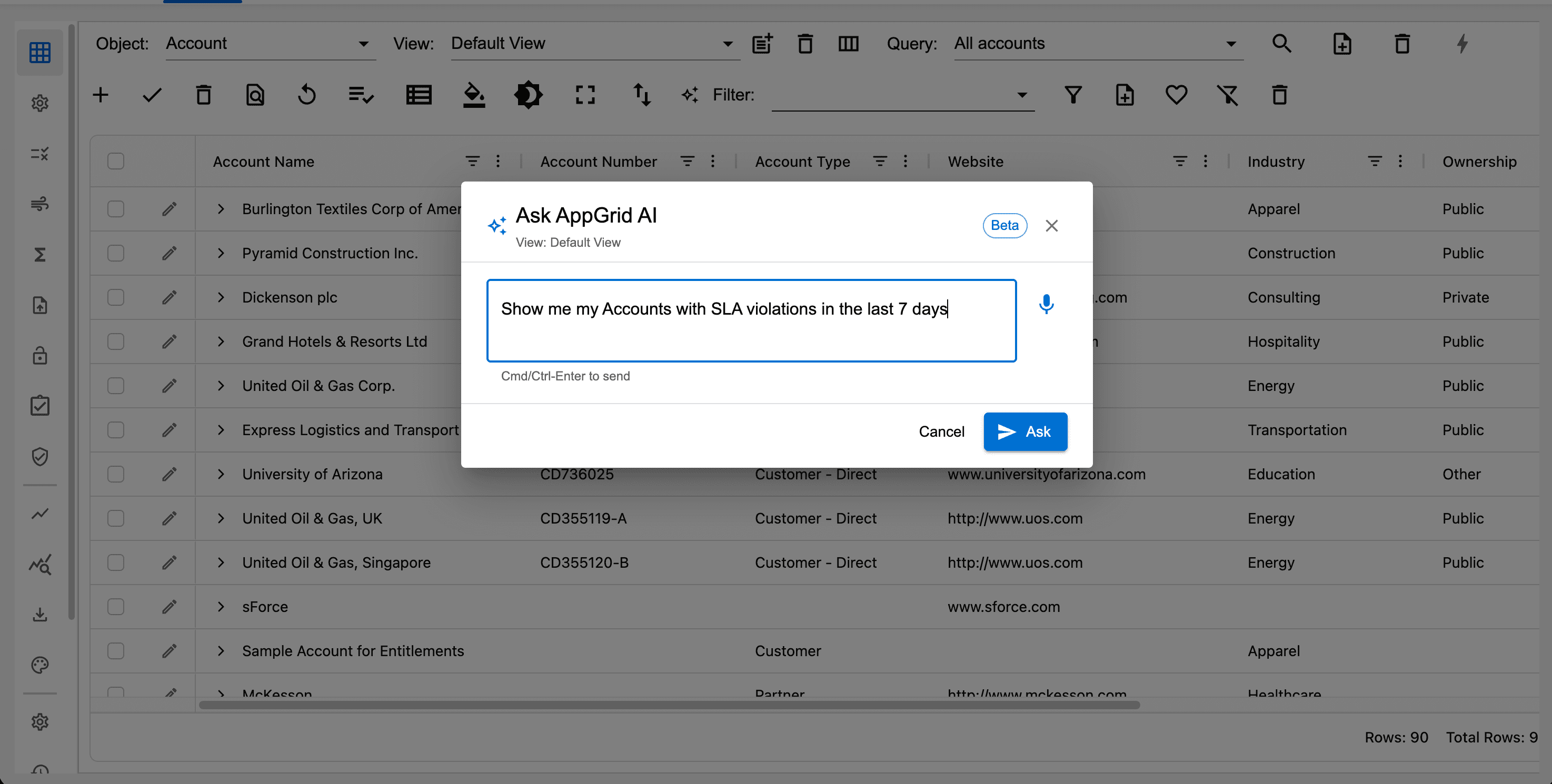
Click the AI assistant button in the grid toolbar. A dialog will display allowing the user to enter their prompt using voice input. Note, you can ask questions with or without selected records. Questions with selected records are more specific and assist the model to generate accurate responses.
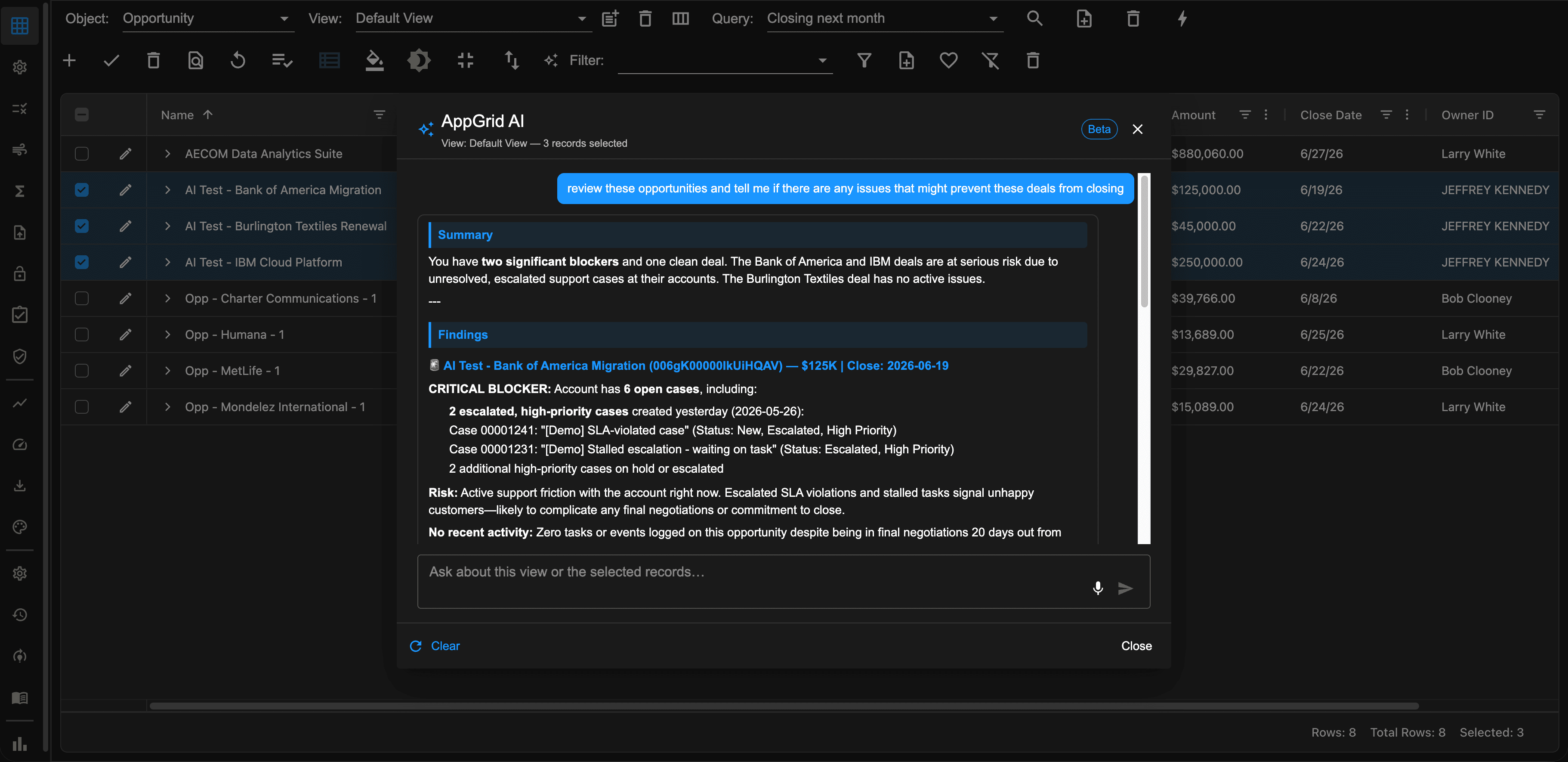
In the example below, we are asking an analysis type question for the selected records so the results will be in the form of a summary, otherwise the query results would have been displayed in AppGrid.
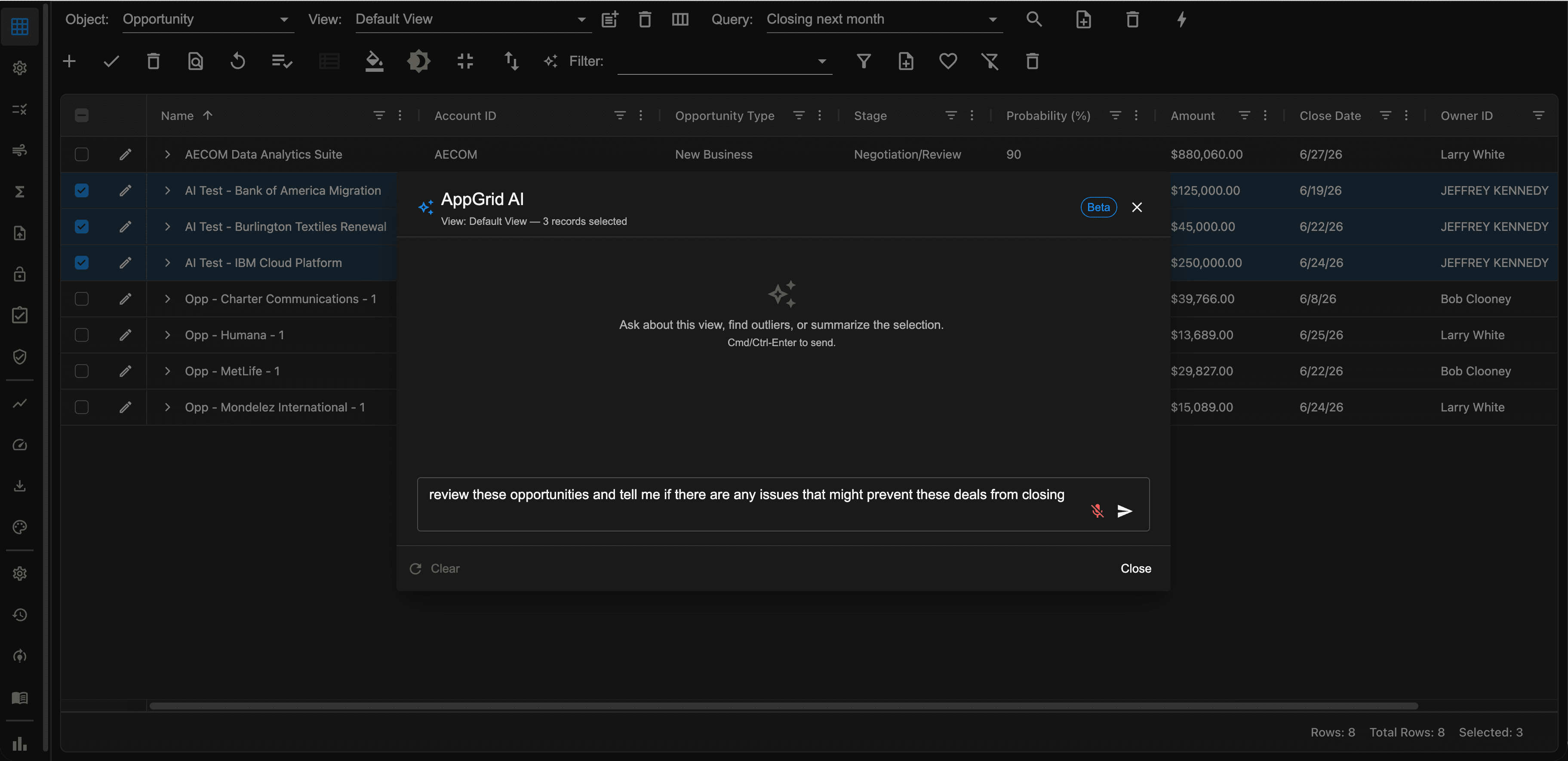
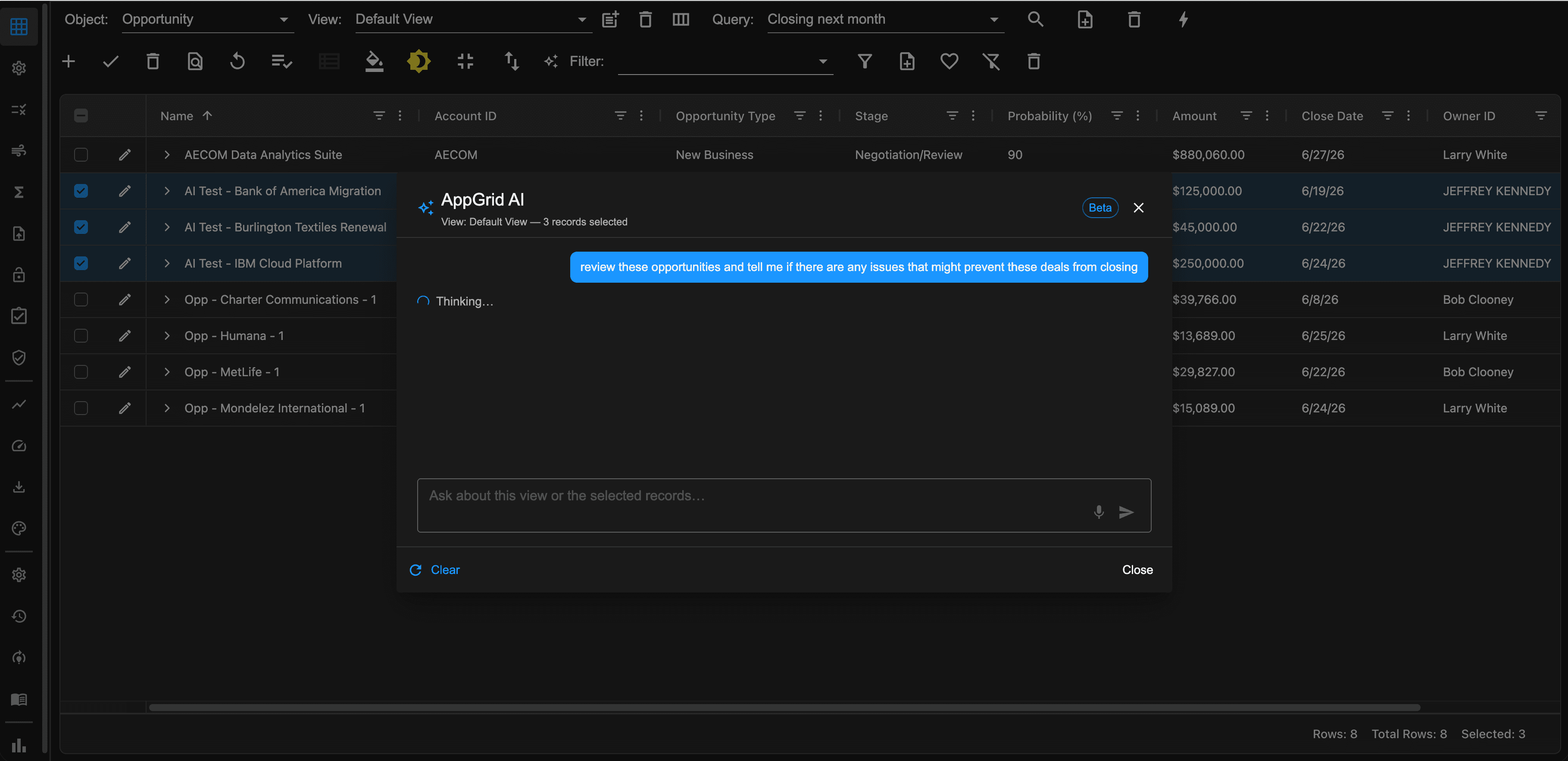
After clicking the submit button, the prompt will be sent to your model and be processed.
The results of your query will be displayed along with recommendations, starting with a summary and then the findings.
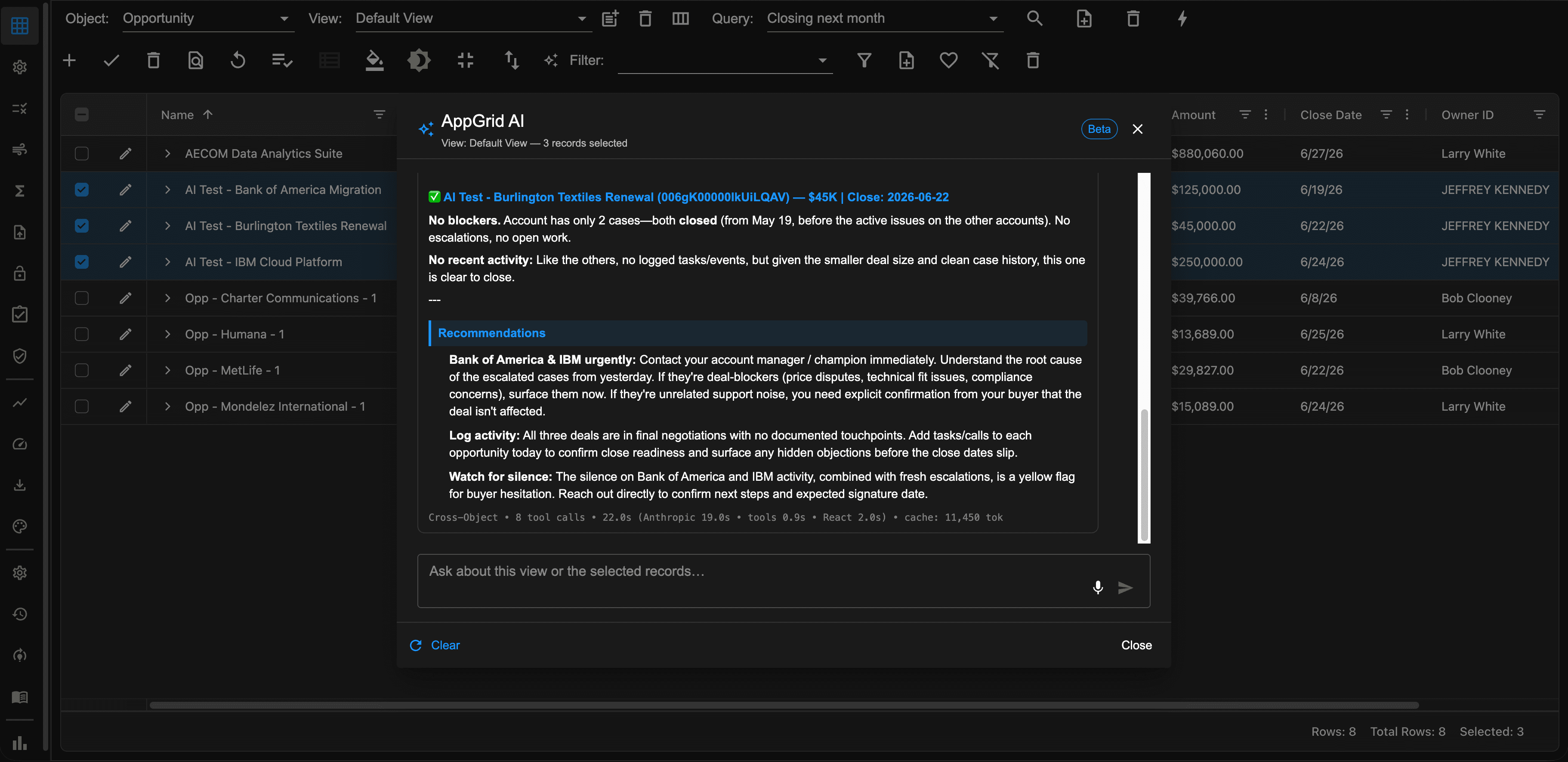
Based on the results, guided recommendations will be provided to assist the user. The power and intelligence of this solution is incredible. The system understand the role of the user submitting the question and will tailor the response appropriately.
The problem it solves
User adoption is still a problem 20+ years after Salesforce was introduced. User’s are frustrated at the amount of time it takes to get their work done. The solution is simple - make the system easier to use. That’s what AppGrid AI brings to the table.
Every Salesforce user has hit this wall. The information exists somewhere — in a related case, on a custom field, in a report somebody else built — but finding it means navigating to the right object, building the right filter, knowing the right field name, and getting all of it right on the first try.
To make informed decisions, users have to find the data they need then surf through various records to make decisions. AppGrid AI flips that on it’s head. Users ask the question they need answered and the AI performs the data retrieval and analysis.
AppGrid AI makes teams using Salesforce more effective, efficient and productive.
“Our previous AI experiment required so much setup we abandoned it.”
This is the most common Salesforce AI story we hear. The tool itself was capable, but standing it up — defining every workflow, mapping every field, training every interaction — required so much admin work that the project stalled before it delivered value.
AppGrid AI installs, asks for your AI provider key, and starts answering questions. No subagent configuration. No action definitions. No verification flow design. No field mapping exercises. The standard Salesforce schema and your org’s existing data are the configuration.
AppGrid AI views to support your AI operations:
AI Assistant: Your interactive voice-powered portal that submits your questions and displays results of your queries.
AI config: Configuration panel the provides settings to control the model behavior
AI domain vocabulary Enables customers to train the system on their unique domain
AI audit log: Displays your history of AI submissions.
Built for the Salesforce platform
AppGrid AI is a Salesforce-native ISV solution. Everything it does respects the platform’s standard security model:
- Every query runs under the asking user’s Salesforce permissions — field-level security, sharing rules, record types, role hierarchy
- Sensitive data the user can’t normally see, they can’t see through AppGrid AI either
- No data leaves your Salesforce org (your AI provider’s terms of service govern data sent to the AI for query translation; AppGrid AI is BYOK so you control the AI provider)
- All AI activity is audit-logged in Salesforce
- Admins can review, edit, or delete any remembered question at any time
- Installation is a standard AppExchange package install
no infrastructure to stand up, no separate vendor relationship to manage
Transparency and reliability of AI applications is critical
This is so important we provide a test harness that each customer can use prior to deployment to test and verify the models performance using bespoke queries that understand the customers domain.
The Audit log captures the execution history and provides visibility into query performance.
The bottom line
AppGrid AI is for teams that want to increase their ability to make better decisions. Ask anything. See results in your grid. Correct what’s wrong. Move on to your next question.
It works on day one. It gets better every day after.
That’s the product.