AppGrid AI - Your intelligent assistant
Every enterprise is asking right now: how do we deploy AI to make our people more effective, efficient and productive?
AppGrid AI is the answer for data intensive workflows. It's included in your AppGrid license at no extra charge. Plug in your provider key and your up and running. No new platform to procure and no extensive rollout to plan and implement. It shows up exactly where your team already works: in the grid, on the views your admin already curated and on the workflows that matter.
AppGrid AI understands your business and your unique salesforce data model. Think of AppGrid AI as an intelligent assistant that helps your users execute their workflows faster.
Ask your Salesforce data anything. See the answer in a grid you can work
AppGrid AI turns plain-English questions into live Salesforce data — not a chat transcript. Ask "Show me high-priority cases open more than 7 days with no activity in the last 48 hours that have not been escalated and are about to breach their SLA." and get the actual records in a grid you can sort, filter, group and act on. Every result is a real record set and if desired, saved as a reusable query.
Chat assistants answer with paragraphs. Your team works with records. When a service manager asks about the case backlog, the useful answer isn't three sentences — it's the 47 cases grouped by priority.
AppGrid also answers questions that genuinely need a narrative - "give me a health summary of my accounts" - a rich summary is provided along with recommendations to help the user be more productive.
Ask it like you would a collegue
AppGrid AI handles the full shape of real questions:
- Find: "Show me my top five deals by amount". "What cases came in this morning"
- Connect: "Which accounts have SLA agreements renewing this month — and any blocking issues?"
- Spot what's missing: "Which opportunities don't have a primary contact". "Which leads has nobody followed up on"
- Count and rank: "Which accounts have the most open cases". "How much pipeline does each rep own"
- Compare: "How does this quarter compare to the same quarter last year"
- Summarize and advise: "Catch me up on Acme before I call them". "Which deals need my attention this week"
Your answers are displayed in the grid ready to view, filter, sort, group and act on.
It also understands your selection. Highlight five rows in the grid and ask "summarize these" or "do any of these have open cases" — the answer is scoped to exactly those records, never the whole org.
And it learns: when you refine an AI-generated query, AppGrid AI remembers. The next person who asks a similar question gets your improved version — your team's knowledge compounds instead of evaporating.
AI driven role-based queries
Some questions are very complex and cannot be answered even with our multi-level enterprise query technology. This is where AppGrid AI comes into play.
It has the ability to analyze the question being asked and to create a plan to solve it using a step-wise process in the same way a human would accomplish the same task.
Here are some types of questions that fit the need for an agentic query process.
sales ops - Show me accounts that have an opportunity closing this month and a high priority case, but no active contract.
customer service - show me high-priority cases that have been open more than 7 days and haven't been escalated.
marketing - show me opportunities that include the MacBook Pro Max 16 product, where the opportunity was created by converting a lead that was a member of the MacBook Pro Max 16 Launch campaign.
finance - show me activated contracts expiring in the next 90 days where the customer has had no sales activity in the last 30 days and no quote has been sent for review.
The power of the solution is incredible. Users can get answers to their most critical business questions with a click of a button and see the results in a grid ready to be operated on.
How does it work?
You ask a question in plain English. AppGrid AI does three things, fast:
1 - Checks if the user has a saved query that already answers it. If yes, it runs that. The work your user has put into saved queries pays off automatically.
2 - Checks if your team has answered this question before. If yes, it executes that query instantly. Deterministic, fast, no AI guesswork required - and no additional AI cost.
3 - Asks the AI to translate your question into a Salesforce query. This only happens for genuinely new questions. The AI generates the query, AppGrid runs it under your permissions, and results appear in your grid — ready to sort, filter, edit, and act on.
Whatever path produced the answer, you see a query you can inspect, edit, and re-run. If something's wrong, fix it in seconds using our query wizard — the correction is remembered for next time. The system gets faster, smarter, and more accurate as your team uses it.
It works on day one against your standard Salesforce data. No subagent configuration. No action definitions. No field mapping exercises. The standard Salesforce schema and your org's existing data are the configuration.
Trust it before you deploy: the AI test harness
Most AI tools ask for your trust. AppGrid AI ships with the tool to earn it. The purpose of the test harness is to validate the model returns accurate responses to the types of questions your users are expected to ask.
The built-in Test Harness comes loaded with 150+ realistic sample questions across 11 business roles — sales rep, sales manager, service agent, customer success, marketing, sales ops, finance, and the C-suite.
Load them with one click and run them against your org's actual data:
See how every question routes — which were answered, which were refused, and why.
2. Verify correctness, not vibes — open any question, review the exact query the AI built, execute it, view the results, correct it if needed, and mark the corrected version as the answer key. From then on, every run is scored against it.
3. Grow the bank — add the questions your team really asks. The harness surfaces the org-specific vocabulary the AI should learn along the way.
It's a permanent regression suite for your AI: change a Topic, add vocabulary, or upgrade — then re-run the bank and see the score.
Safe by design
Read-only, guaranteed. AppGrid AI never creates, updates, or deletes a record. Ask it to change data and it tells you plainly: data updates are not supported
Every query runs as the asking user, under Salesforce's native object, field, and sharing rules. A user can never see data through the AI that they couldn't see in a report.
Your AI provider, your key. AppGrid AI connects to the AI provider under your organization's own API key. Your questions and result samples go only to the provider you chose, under your agreement with them — never to us, and never to train anyone's models. Logged and inspectable. AI activity is recorded in your org — who asked what, what the AI did, what it answered — with retention you control.
Up and running in a day
Install AppGrid from the AppExchange
Connect your AI provider key
Load the sample question bank and run it against your data.
Roll it out to your team — with the harness score to back the decision.
No model training. No prompt engineering. No implementation project.
What your team asks on day 1
Role | The ask... | The get... |
|---|---|---|
| CEO | How is my business doing? | A comprehensive summary of KPI's and business issues |
| CFO | Summarize our revenue exposure from expiring contracts | A grounded briefing plus the contracts themselves, in the grid |
| Sales Manager | Which deals on my team are at risk and need my attention? | The at-risk deals as a working list — group it by rep, act on it |
| Sales Rep | Help me plan my day | A prioritized plan across deals, meetings, tasks, quotes, approvals |
| Service Agent | What's in my queue this morning? | Escalations first, then milestones due, then aging cases displayed in the grid |
| Customer Success | Which accounts have renewals coming up with open issues? | The accounts, flagged, with the blocking cases visible |
| Marketing | Which campaign generated the most pipeline this year? | The ranked answer, with records behind every number |
| Sales Ops | Which leads are sitting untouched? | The leakage list, grouped by owner |
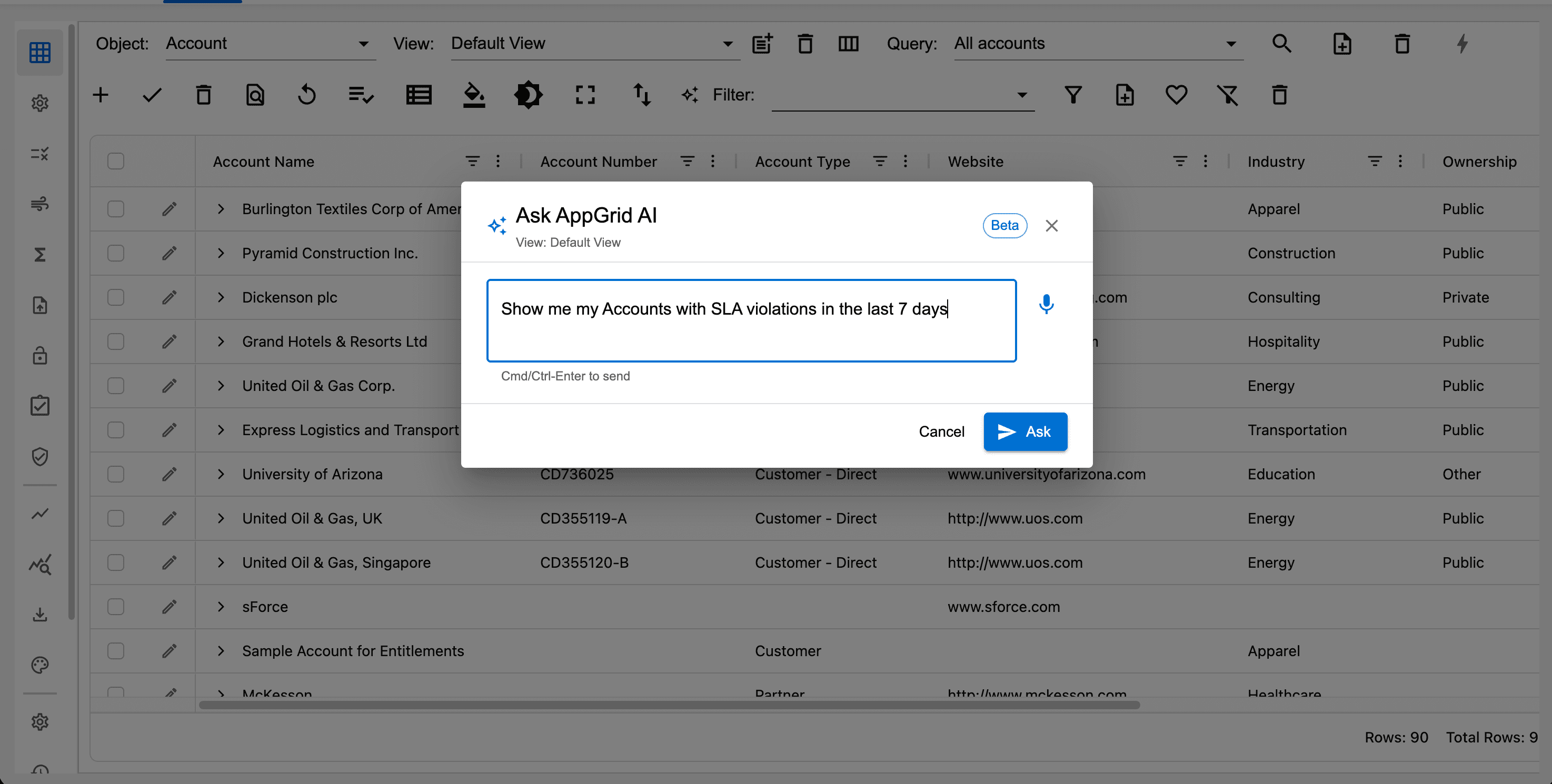
Click the AI assistant button in the grid toolbar. A dialog will display allowing the user to enter their prompt using voice input. Note, you can ask questions with or without selected records. Questions with selected records are more specific and assist the model to generate accurate responses.
In the example below, we are asking an analysis type question for the selected records so the results will be in the form of a summary, otherwise the query results would have been displayed in AppGrid.
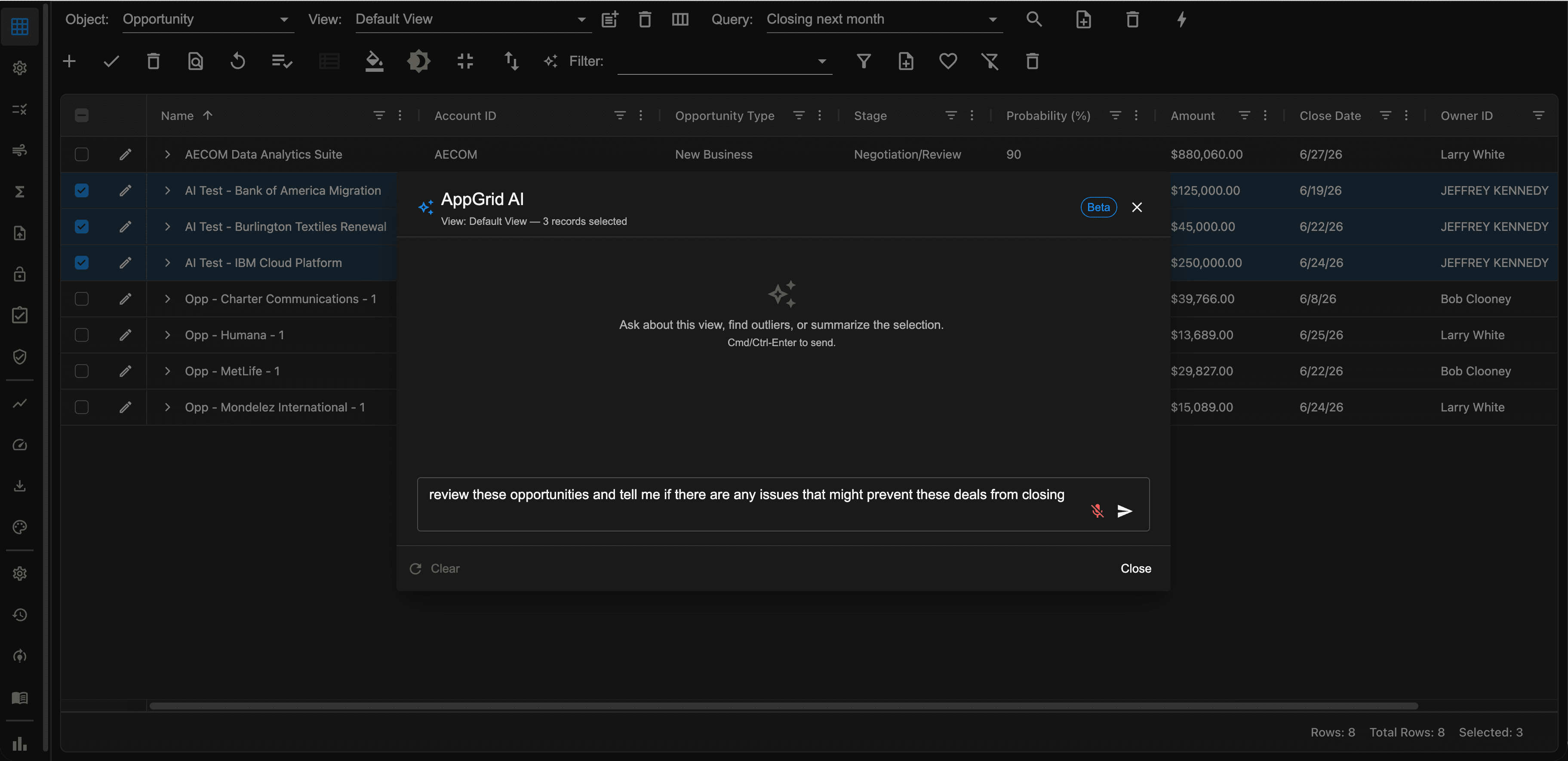
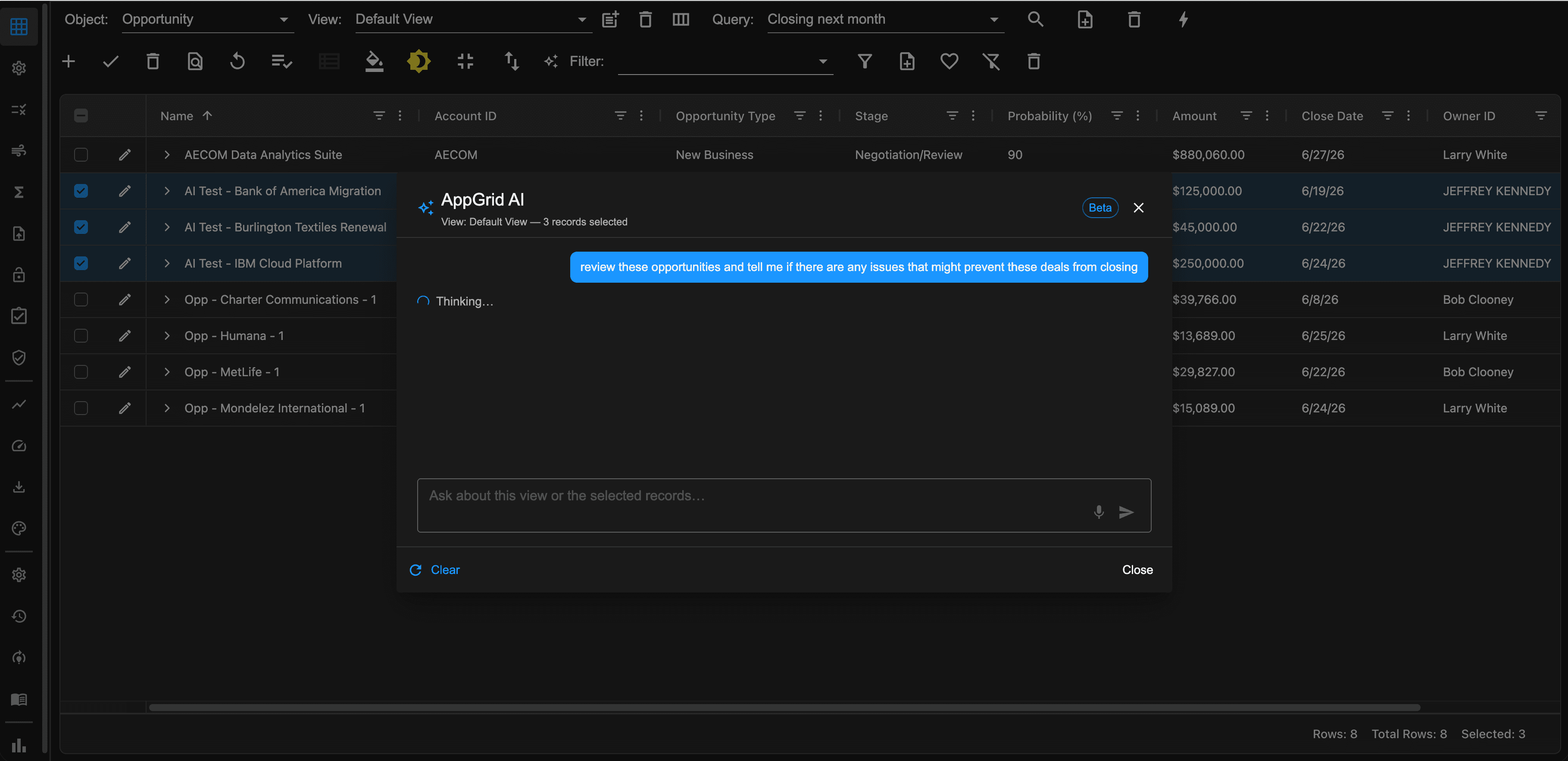
After clicking the submit button, the prompt will be sent to your model and be processed.
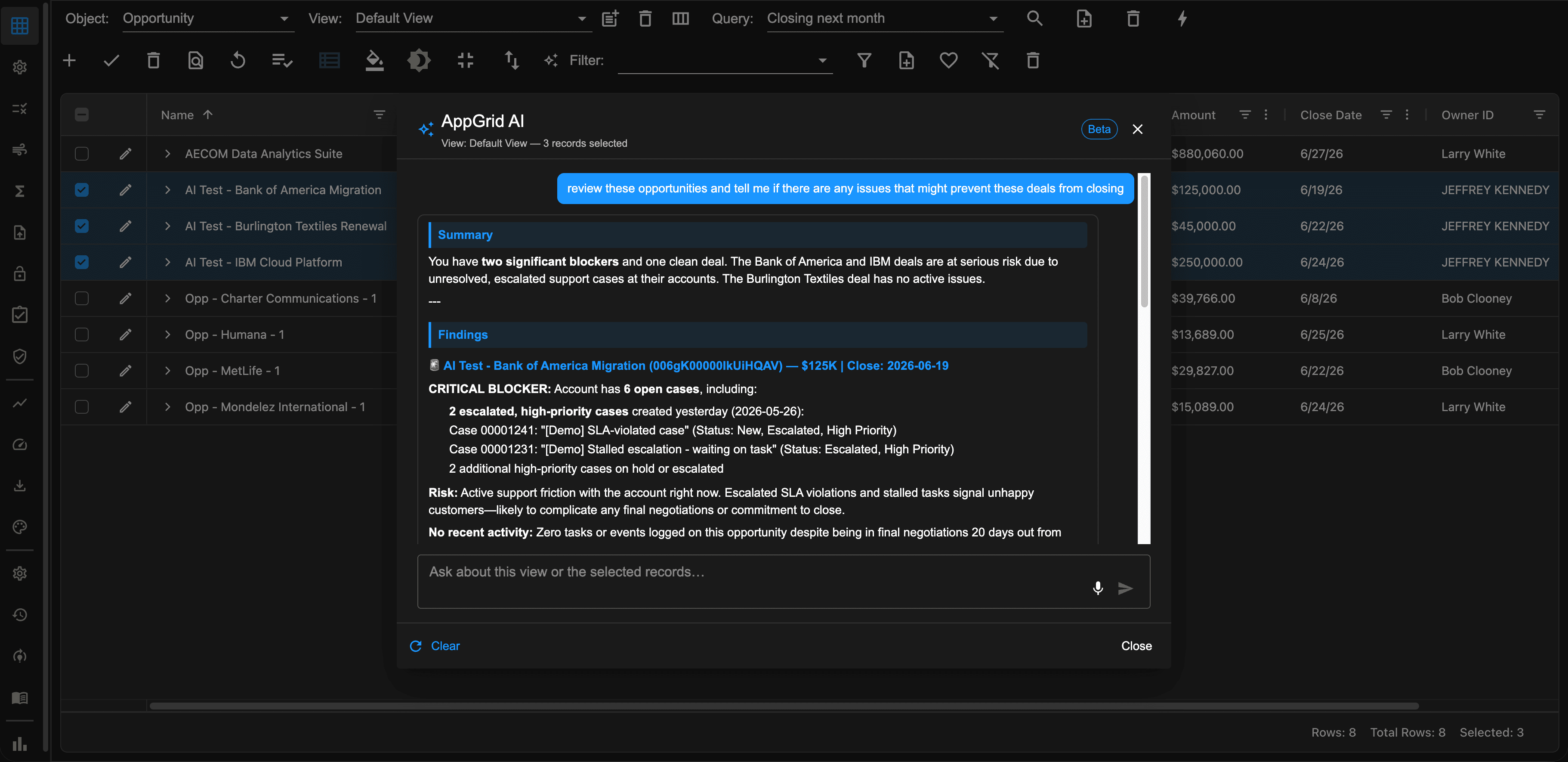
The results of your query will be displayed along with recommendations, starting with a summary and then the findings.
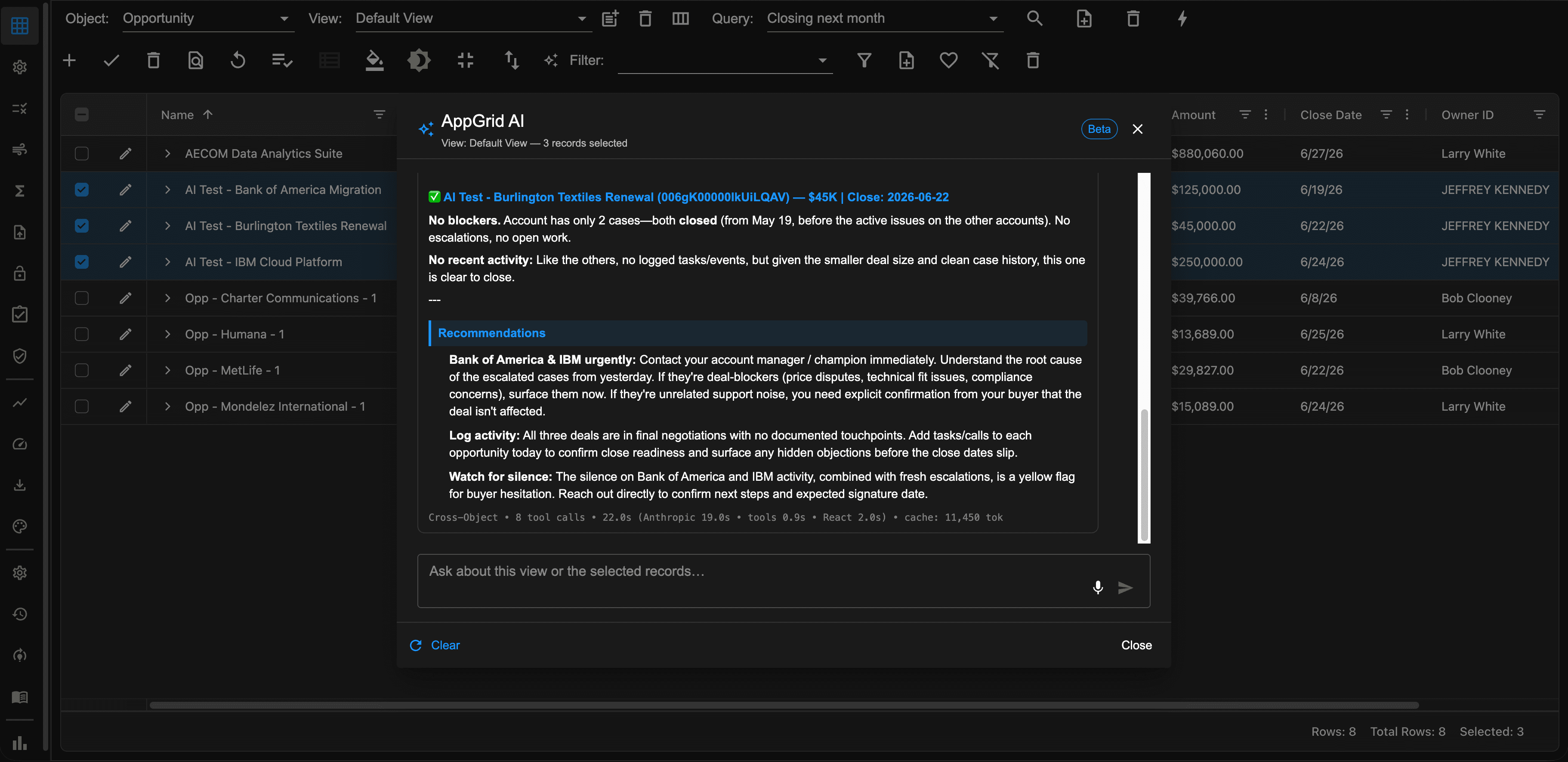
Based on the results, guided recommendations will be provided to assist the user. The power and intelligence of this solution is incredible. The system understand the role of the user submitting the question and will tailor the response appropriately.
The problem it solves
User adoption is still a problem 20+ years after Salesforce was introduced. User's are frustrated at the amount of time it takes to get their work done. The solution is simple - make the system easier to use. That's what AppGrid AI brings to the table.
Every Salesforce user has hit this wall. The information exists somewhere — in a related case, on a custom field, in a report somebody else built — but finding it means navigating to the right object, building the right filter, knowing the right field name, and getting all of it right on the first try.
To make informed decisions, users have to find the data they need then surf through various records to make decisions. AppGrid AI flips that on it's head. Users ask the question they need answered and the AI performs the data retrieval and analysis.
AppGrid AI makes teams using Salesforce more effective, efficient and productive.
"Our previous AI experiment required so much setup we abandoned it."
This is the most common Salesforce AI story we hear. The tool itself was capable, but standing it up — defining every workflow, mapping every field, training every interaction — required so much admin work that the project stalled before it delivered value.
AppGrid AI installs, asks for your AI provider key, and starts answering questions. No subagent configuration. No action definitions. No verification flow design. No field mapping exercises. The standard Salesforce schema and your org's existing data are the configuration.
AppGrid AI provides 6 types of views, each optimized to support your AI operations:
AI Assistant: Your interactive voice-powered portal that submits your questions and displays results of your queries.
AI audit log: Displays your history of AI submissions.
AI training log: Displays a history of low-confidence queries which can be used to optimize the model
AI testing portal: Enables customers to test domain specific queries and validate model performance
AI domain vocabulary Enables customers to train the system on their unique domain
AI config: Configuration panel the provides settings to control the model behavior
AppGrid AI vs Agentforce
AI is all the hype these days, and you may be wondering why AppGrid AI was developed and how is it different from the Salesforce AI offerings.
AppGrid and Agentforce solve different problems.
Agentforce (and Agentforce CoWorker) are built for conversational AI — natural-language chat, reasoning and automated actions - and the capabilities they provide are truly impressive.
AppGrid AI also provides a conversational interface but is built for high-fidelity and high volume data interactions — responses delivered in a fast, feature rich grid you can sort, filter, edit, and act on. We evaluated and tested the AppGrid AI data experience built with Agentforce APIs and chose a different architecture for three reasons.
1. Complete result sets, not truncated ones. The Agent API returns a conversational response — the agent's message. To return data to an external application, the records must be re-expressed as text inside that message, which is bounded by the model's response size. In our testing, large result sets were truncated; faithful structured returns were reliable only up to a few dozen records. A data grid routinely works with hundreds or thousands of rows. AppGrid queries your data directly, so you get the complete result set for any size.
2. Unaltered data values. Agentforce applies content-safety filtering to its responses — including redacting URLs that aren't on an allowlist. Because that filtering operates on the response text, data values that resemble URLs (company websites, domains in a record name, links in a note) can be silently altered in transit — and the response still looks valid. For a system of record, that's unacceptable. AppGrid returns your data exactly as stored, with no transformation layer between you and your records.
3. Performance. AppGrid AI is built on our enterprise query technology — the same one behind every AppGrid grid. The AI doesn't fetch your data; it writes the query. The engine runs it as native, governed SOQL under your own field-level security and sharing and returns the result.
This is about fit, not quality.
Agentforce's conversational layer behaves exactly as it should for chat — bounded responses, safety filtering on links. Those same behaviors simply make it the wrong place to pipe a high-fidelity data grid.
They're complementary: Agentforce executes the processes you've engineered;. AppGrid AI answers everything in between. Many of our customers will run both.
Built for the Salesforce platform
AppGrid AI is a Salesforce-native ISV solution. Everything it does respects the platform's standard security model:
- Every query runs under the asking user's Salesforce permissions — field-level security, sharing rules, record types, role hierarchy
- Sensitive data the user can't normally see, they can't see through AppGrid AI either
- No data leaves your Salesforce org (your AI provider's terms of service govern data sent to the AI for query translation; AppGrid AI is BYOK so you control the AI provider)
- All AI activity is audit-logged in Salesforce
- Admins can review, edit, or delete any remembered question at any time
- Installation is a standard AppExchange package install
no infrastructure to stand up, no separate vendor relationship to manage
Transparency and reliability of AI applications is critical
This is so important we provide a test harness that each customer can use prior to deployment to test and verify the models performance using bespoke queries that understand the customers domain.
We have a domain vocabulary view that allows each customer to enter domain specific terms that user questions may contain. This provides additional information that helps the model understand the context and question, resulting in improved model performance.
We monitor the AI execution and make visible any queries that result in a low-confidence understanding. Usually, AI performance can be improved by adding additional domain hints.
The bottom line
AppGrid AI is for teams that want their Salesforce data to feel as findable as a web search. Ask anything. See results in your grid. Correct what's wrong. Move on to your next question.
It works on day one. It gets better every day after.
That's the product.